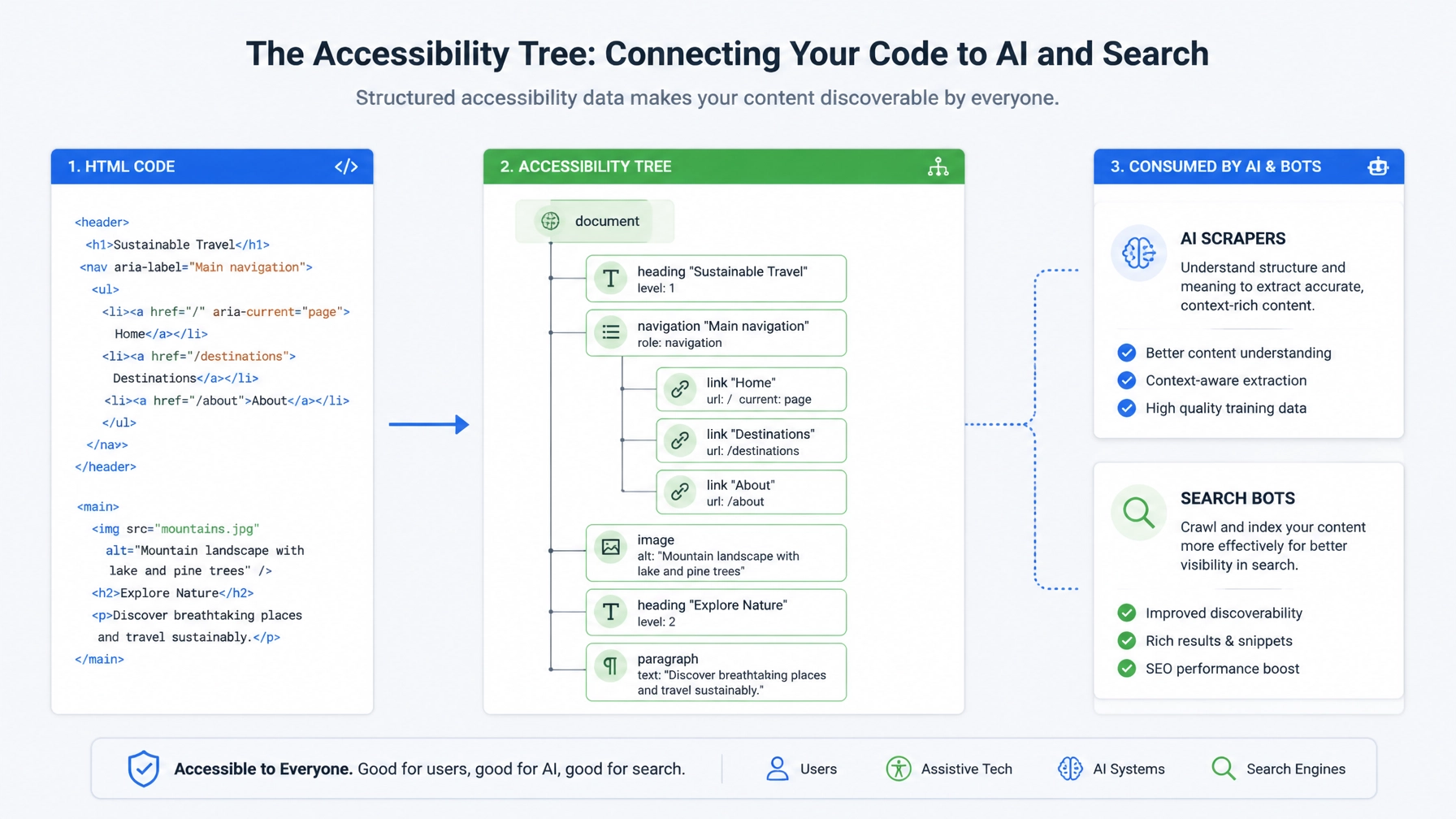
When an AI crawler evaluates your website, it does not admire your CSS gradients, your bespoke typography, or your meticulously aligned hero banners. It strips away the visual layer entirely and reads the accessibility tree.
For over two decades, search engine optimization focused almost exclusively on what Googlebot could render through its headless browser. Today, that paradigm is obsolete. According to recent search engineering data, over 74% of enterprise web traffic interactions now involve automated machine agents, LLM scrapers, and generative search retrieval systems that bypass standard visual rendering. These systems depend on semantic HTML and accessibility trees to understand, index, and execute actions on your digital properties.
If your site is optimized only for traditional visual crawling while neglecting its underlying machine-readable data model, your content is effectively invisible to modern answer engines. Conducting an accessibility tree audit is no longer optional: it is essential for survival in an AI-driven search ecosystem.
1. What Is an Accessibility Tree Audit?
The accessibility tree is a simplified, semantic representation of your webpage built directly by the browser. It discards visual noise: such as decorative wrapper divs, floating containers, and complex styling rules: and retains only meaningful elements: headings, text, links, buttons, form fields, and structural landmarks.

An accessibility tree audit is a systematic inspection of this structural hierarchy to ensure that every crucial piece of content, interactive control, and user flow is accurately exposed to non-visual software. While originally designed for screen readers used by visually impaired individuals, this exact data structure has become the primary navigational map for AI scrapers, autonomous shopping agents, and large language model retrieval pipelines.
When an AI agent visits your product page or booking form, it does not "see" a blue button with white text. It queries the accessibility tree for an element with the role of button and an accessible name like "Book a Consultation" or "Add to Cart." If that element is wrapped in a non-semantic div with an undocumented JavaScript click listener, the accessibility tree registers nothing. To the AI agent, the button: and the conversion opportunity: simply does not exist.
2. How AI Scrapers Digest Pages Differently Than Human Browsers
Traditional web design caters to human eyesight. We rely on visual hierarchy: larger fonts, contrasting background colors, spatial proximity, and hero imagery: to guide our attention through a page.
AI scrapers and LLM retrieval engines operate on an entirely different cognitive model. They consume the raw HTML DOM and immediately translate it into an accessibility tree or vector embedding space.
- Visual vs. Structural Hierarchy: A human instantly understands that a bolded, 14pt sentence above a pricing table is a subheading. An AI scraper requires a genuine semantic heading tag (
<h2>or<h3>) nested in a logical order. If your developers styled adivto look like a heading without applying the proper tag, the AI parsing engine treats it as flat, unstructured body text: destroying its topical weight. - Interactive Intent: Humans deduce interactive elements from visual cues (e.g., underlining, shadows, pointer cursors). AI scrapers evaluate interactive capability strictly through native HTML semantics (
<a>,<button>,<input>) and explicit ARIA roles. - Content Noise Reduction: Automated scrapers actively filter out boilerplate navigation, cookie banners, and decorative sidebars by examining structural landmarks (
<header>,<nav>,<main>,<footer>). If your core content is buried inside generic container elements without semantic landmark wrapping, AI scrapers frequently misinterpret context or truncate valuable paragraphs during summarization.
3. The Direct Relationship Between Accessible HTML and AI Parseability
The foundation of a robust accessibility tree is clean, semantic HTML. When you build with native standards, you solve two massive business challenges simultaneously: you comply with global accessibility standards (ADA/WCAG), and you maximize your parseability for Answer Engine Optimization (AEO).

Too many digital teams rely on "div soup": the lazy practice of building entire user interfaces out of nested div and span elements driven by heavy JavaScript frameworks. While a modern headless browser like Googlebot can eventually execute JavaScript and render the visual DOM, the resulting accessibility tree is often bloated, confusing, or completely devoid of semantic roles.
To ensure your HTML translates into a pristine accessibility tree, adhere to these structural rules:
- Use Native Elements First: Deploy
<button>for actions,<a>for navigation links, and<form>controls for user input. Never delegate core interactions to generic elements. - Enforce Strict Heading Hierarchies: Maintain a single
<h1>per page, followed by sequential<h2>and{3}tags without skipping levels. This creates an unbroken document outline that AI models use for semantic chunking and retrieval. - Define Explicit Accessible Names: Every interactive control must feature clear text or an
aria-labelthat communicates intent. Vague labels like "Click Here" or empty button nodes cause AI execution pipelines to fail instantly.
For businesses looking to overhaul their underlying architecture, integrating comprehensive SEO services ensures that your technical infrastructure satisfies both traditional search engine crawlers and emerging AI retrieval bots.
4. Uncovering Hidden AI-Scraping Roadblocks with Lighthouse and Axe Audits
You cannot fix what you do not measure. Fortunately, auditing your site's accessibility tree does not require enterprise-grade proprietary software; powerful diagnostic tooling is already built into your browser and open-source ecosystems.
Chrome DevTools Accessibility Pane
- Open any page on your website in Google Chrome and launch DevTools (
F12). - Navigate to the Elements panel and select the Accessibility tab in the sidebar.
- Check the box to "Show accessibility tree" to transform the standard DOM view into the exact hierarchical model perceived by AI scrapers and screen readers.
- Walk through your primary conversion funnels: such as your homepage, pricing page, and contact flows: inspecting whether your primary calls-to-action, form fields, and content modules appear correctly.
Automated CI/CD Testing with Axe and Lighthouse
To prevent regressions, integrate automated accessibility testing tools like Deque's Axe or Google Lighthouse into your development pipeline:
- Lighthouse Audits: Run performance and accessibility audits to catch missing ARIA labels, unlabelled form inputs, and broken contrast ratios that often correlate with poor structural semantics.
- Axe Core Integration: Run automated scans across your staging environments to flag missing document landmarks and improper heading sequences before code reaches production.
When paired with a rigorous content gap analysis, these audits reveal whether your high-value informational assets are structured in a way that AI search engines can easily parse, cite, and recommend in conversational overviews.
5. A Practical Checklist for Optimizing Accessibility Trees for Machine Consumption
To transform your website into an AI-ready asset, execute this step-by-step optimization checklist across your high-value "money pages":
- Audit Money Pages First: Prioritize your homepage, core product/service pages, pricing, and booking funnels.
- Eliminate Div-Based Interactions: Replace all clickable
divorspanelements with native<button>or<a>tags. - Validate Landmark Regions: Ensure your page layout is wrapped in explicit semantic landmarks (
<header>,<main>,<aside>,<footer>,<nav>). - Refine Form Input Labels: Attach explicit
<label>tags to every input field so AI agents understand form requirements instantly. - Audit Heading Outlines: Verify that your heading structure tells a cohesive story that an LLM can summarize without external context.
- Test Keyboard and Non-Visual Navigation: Walk through your conversion flows using only the keyboard and your browser's accessibility tree inspector.

For teams managing complex technical environments, leveraging expert SEO tools support can streamline monitoring and automate the detection of structural decay before it harms your search visibility.
6. Why This Matters for Answer Engine Optimization (AEO)
The rules of digital visibility have fundamentally changed. Traditional search optimization focused on ranking blue links on a results page. Answer Engine Optimization (AEO) requires your content to be extracted, synthesized, and cited directly within AI-generated responses, or executed seamlessly by autonomous shopping and booking agents.
When your accessibility tree is clean, structured, and semantically rich, you provide AI engines with a frictionless data feed. You eliminate parsing errors, ensure your calls-to-action are actionable for automated agents, and secure your brand's position as a trusted, machine-readable authority.
Do not let poor HTML architecture lock your business out of the generative search era. Book a consultation with Expert SEO Consulting today to audit your site's accessibility tree and future-proof your organic search visibility.